Every TV in this comparison is a smart TV: “smart” just means it connects to the internet and runs apps. Android TV and Google TV are both Google’s software, and Google TV is simply the newer home screen that runs on top of Android TV, so most new TVs from brands such as Sony, TCL and Vu ship with it. The real choice in 2026 is between five systems: Google TV, Samsung’s Tizen, LG’s webOS, Amazon’s Fire TV and VIDAA on Hisense and Toshiba sets.
For most Indian homes, Google TV is the safest pick for apps and casting, as long as the TV has enough memory. Samsung is the better bet if you keep a TV for many years: it promises OS upgrades for up to seven years on its 2023-and-later range. LG’s upgrade programme covers select models only. Here’s how they differ, and what to check on the listing.
What is the difference between Google TV and Android TV?
Android TV is the operating system underneath; Google TV is the interface on top of it. A TV sold as “Google TV” runs Android TV OS with Google’s newer home screen. A TV sold as plain “Android TV” runs the same system with the older, app-first home screen.
What the Google TV layer adds is mostly about finding things to watch:
- Recommendations across apps. The home screen is organised around films and shows rather than app icons, pulling suggestions from the services you use.
- Profiles. Each family member gets their own recommendations and watchlist, and kids’ profiles can have watch limits and a bedtime.
- A shared watchlist that you can add to from the TV, the Google TV phone app or a Google search on your phone.
Both give you the Play Store, Google Assistant and Chromecast built in, so the apps and casting are the same. Google TV also has a basic TV mode for people who don’t want a Google account on the TV: the tuner, HDMI inputs and a few preinstalled apps work, but you can’t install apps or cast. Choose at setup, because moving to basic TV mode later needs a factory reset.
Plain Android TV still turns up on some of the cheapest 32-inch and lesser-known sets. If a listing says “Android TV” rather than “Google TV”, check its memory and Android version on the spec sheet.
Smart TV vs Android TV: what “smart TV” really means
When a listing says “Smart TV” without naming Google, the TV runs some other system, and that matters more than the label. Samsung’s Tizen and LG’s webOS are polished and widely supported. Amazon’s Fire TV, VIDAA and Jio’s JioTele OS are full smart-TV systems, each with its own app selection. At the bottom of the market, some sets run a light Linux system with a short list of apps.
None of these is worse just for not being Android. What differs is the app store, how long the TV gets updates, how you cast from your phone, and how many ads you see.
Which TVs run what in India
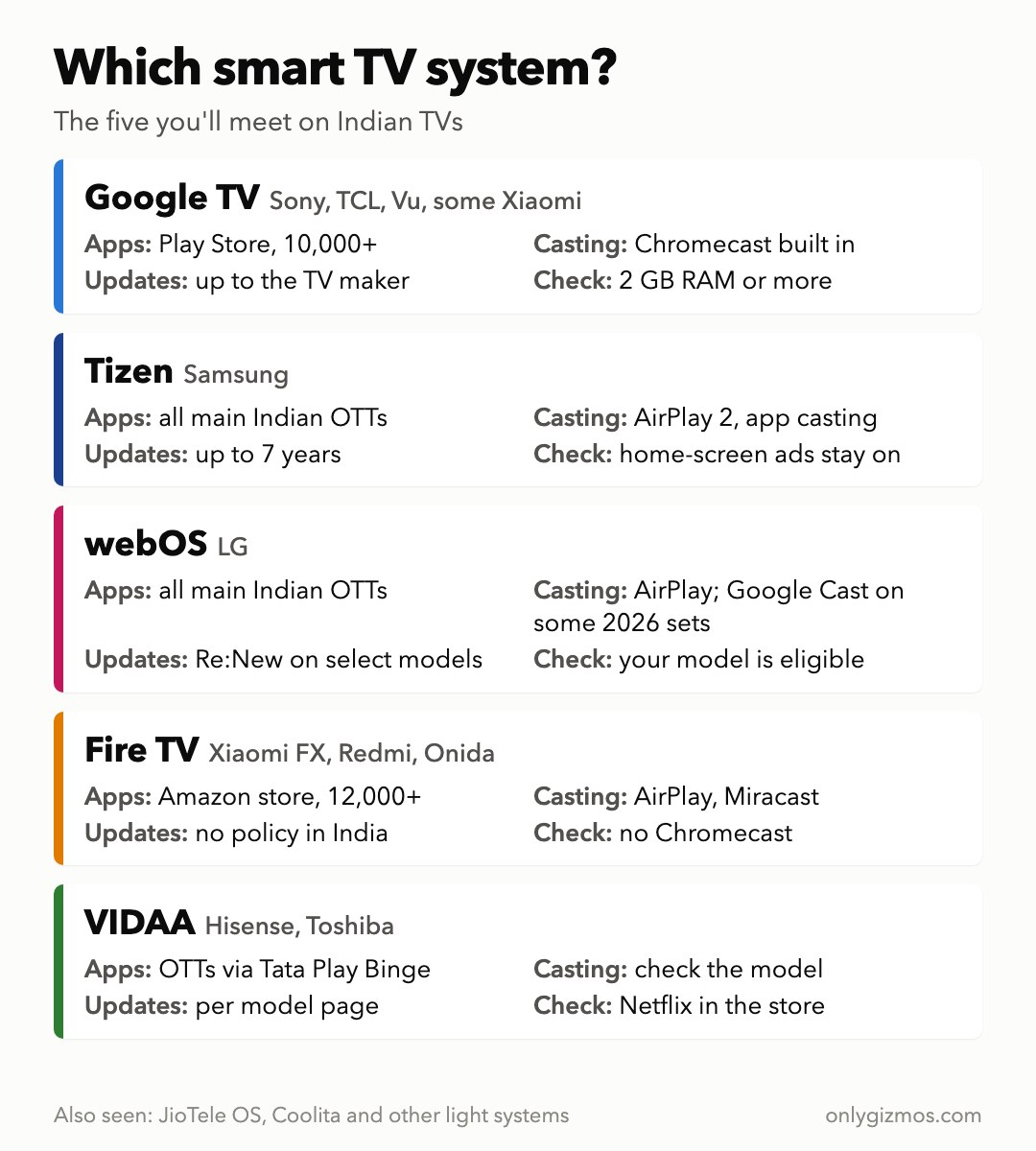
- Google TV: Sony, TCL, Vu, Acer and some Xiaomi and Hisense models. For example, the Vu Glo MiniLED 55 (around Rs 45,000) and the Sony Bravia 8 II (around Rs 2,44,500).
- Tizen: every Samsung smart TV, for example the Samsung M80H (around Rs 64,000).
- webOS: every LG smart TV, for example the LG 55NU870BPLA (around Rs 43,000) or the 32-inch LG 32LB655BPLA (around Rs 19,000).
- Fire TV: Xiaomi’s FX range, Redmi and Onida, for example the Xiaomi FX Pro 55 (around Rs 40,000).
- VIDAA: some Hisense models and Toshiba, for example the Hisense 55E8S (around Rs 50,500).
- JioTele OS: some newer Thomson, Kodak, BPL, JVC and Blaupunkt sets.
- Coolita: Coocaa’s own light system on some of its TVs.
Roku TVs aren’t officially sold in India.
Apps: will your OTT apps be there?
The big apps are everywhere. Netflix, Prime Video, JioHotstar and YouTube are on Google TV, Tizen, webOS and Fire TV, and so are SonyLIV and Hoichoi on recent models. The differences show up at the edges:
- Google TV and Android TV have the Play Store, with more than 10,000 apps. That’s where regional and niche services, live-TV apps and IPTV players turn up first, and you can sideload an app that isn’t listed. Jio’s JioTV+ live-TV app, for example, reached Google TV and Fire TV at launch, while Samsung and LG owners were left waiting. It also needs a JioFiber or AirFiber plan, so check your TV’s store if you want it.
- Fire TV has its own store with more than 12,000 apps, including the main Indian OTTs, and also allows sideloading.
- Tizen and webOS cover all the mainstream Indian apps, but they don’t run Android apps, so a niche app may never arrive.
- VIDAA gets Prime Video, JioHotstar, ZEE5 and Apple TV+ in India through Tata Play Binge, but Netflix isn’t part of that bundle, and it isn’t clear that Indian VIDAA sets carry it, so look for it in the TV’s app store before you buy.
- Coolita and other light systems are where the gaps are real: one Coocaa model launched with only Prime Video and YouTube.
If you rely on a less common regional or live-TV app, Google TV is the safest choice, because the Play Store has the widest catalogue. If you only use Netflix, Prime Video, JioHotstar and YouTube, Google TV, Tizen, webOS and Fire TV all work. On VIDAA, check for Netflix first.
Updates: how long will the TV stay current?
This is where Samsung and LG pull ahead.
- Samsung Tizen: free OS upgrades for up to seven years from the model’s launch year, for 2023-and-later TVs. The clock starts at launch, so buy a current-year Samsung rather than last year’s stock.
- LG webOS: LG’s Re:New programme gives eligible TVs four version upgrades spread across five years. In India only select models qualify, so check the product page for your exact TV.
- Google TV: Google makes no promise for TVs: updates depend on the TV maker and are often slow to arrive. Google has also skipped versions for TV (13 and 15), so check that a listing says Android TV 14. Sets on 11 or 12 are already behind.
- Fire TV: Amazon commits to at least four years of security fixes for its own Fire TV devices once it stops selling them, and has extended that to some Fire TV TVs in the US. Xiaomi and Redmi publish no update policy in India, so don’t count on new versions.
- VIDAA: Hisense publishes no update policy for India as a whole, but some model pages, such as the 55E8S’s, list eight years of VIDAA updates. Check the page for your exact model.
Updates matter for app support: an app can stop supporting an older system version years before the TV wears out.
Speed: memory matters on Google TV
Google TV needs a fair amount of memory, and on budget sets it shows. Google’s own rule asks for at least 2 GB of memory on Google TV sets, but some Indian listings show 1.5 GB, and Google has said it will allow lower-memory Google TVs. Google has even shipped updates to make Google TV faster and free up storage.
The same limit decides newer features. Gemini, which replaces Google Assistant on supported Google TVs, needs Android TV 14 or later and at least 2 GB of memory. It is reaching newer Indian sets such as the Vu Glo MiniLED. Sets with 1.5 GB or Android TV 11 or 12 can’t run it, and on others, count on it only if the listing names it.
Some owners commenting on Indian TV videos say their Google TV began to lag after about a year, and one budget LG owner says the same of webOS. So on a Google TV, look for at least 2 GB of RAM, and treat 8 GB of storage as tight: it fills up as apps update, and more is better. Samsung and LG don’t publish memory figures, so on a cheap set from either, read owner reviews instead.
Casting from your phone
- Google TV: Chromecast is built in, so any app with a cast button can send video from your phone.
- Samsung: AirPlay 2 on 2019-and-later TVs, plus casting from apps like YouTube and Netflix.
- LG: AirPlay 2, and Google Cast on some 2026 models such as the 55NU870BPLA and 32LB655BPLA. Older LGs may have AirPlay only.
- VIDAA: phone-to-TV sharing of photos and videos is the only casting Hisense India describes, so check the spec sheet if you cast a lot.
- Sony: Google TV with Chromecast, plus AirPlay.
- Fire TV: AirPlay and Miracast on the Xiaomi sets, but no Chromecast.
iPhone households are covered by Samsung, LG, Sony and the Xiaomi Fire TV sets. If your family is mostly on Android phones, Google TV or a 2026 LG with Google Cast is the easiest.
Ads and privacy
Google TV, Samsung, LG and Fire TV all show some advertising. Google TV shows sponsored content on its home screen, even in its “apps only” mode. Samsung shows its free TV Plus channels and promotional tiles, and owners report there’s no full opt-out. LG shows promotions on its screensaver, which you can turn off under Settings > General > System > Additional Settings > Screen Saver Promotion. Fire TV autoplays featured videos; you can turn off the autoplay, not the banner. These menu paths come from overseas models and may be worded differently on Indian sets.
These TVs can also recognise what’s on screen and log it to target ads (the industry calls it ACR). On overseas models you switch it off like this: on Samsung, untick Viewing Information Services under Settings > General & Privacy > Terms & Privacy > Privacy Choices; on LG, turn off Live Plus, LG’s viewing-data setting, under Settings > General > System > Additional Settings. Indian menus can differ by model and year, so search Settings for those names. On Google TV, basic TV mode avoids a Google account entirely, at the cost of apps and casting.
Labels that confuse buyers
- “Smart TV” with no system named can mean a light system with few apps. Look for the OS name on the spec sheet.
- “Google TV” with 1.5 GB RAM is a budget set that may feel slow and won’t get Gemini.
- “Fire TV built-in” means Amazon’s system and Alexa, not Google’s. The apps are there, but you won’t get Chromecast.
Which should you buy?
- You want every app and easy casting: Google TV with at least 2 GB of RAM. Our TVs with Google Assistant and Chromecast page lists good options.
- You’ll keep the TV for many years: Samsung (Tizen), for up to seven years of OS upgrades. An LG works too if its product page lists webOS Re:New.
- You live in Amazon’s world, with Prime and Alexa: Fire TV is fine and the apps are all there, but expect no Chromecast.
- You’re buying a Hisense or Toshiba on VIDAA: check that your apps are listed before you pay, especially Netflix.
- The cheapest TV says only “Smart TV” or “Android TV”: check the app list and memory, or spend a little more on a Google TV, Samsung or LG.
Where to go next: our guides to the best 43-inch smart TVs, smart TVs under Rs 20000, 55-inch 4K TVs under Rs 60000 and 55-inch 120Hz TVs name our picks at each budget.
Last updated: October 2026